
Linux: Script to test IPs
Brocade Blue
Friday, January 05, 2018
1 Comments
So today I was sitting free, and the sysadmin gave me a list of IPs to ping. Being the lazy person I am, I decided to look online for ready-made scripts to ping IPs and list out the results pingable (UP) unpingable (DOWN)
The first search result had a lot of samples to work with and I picked the best:
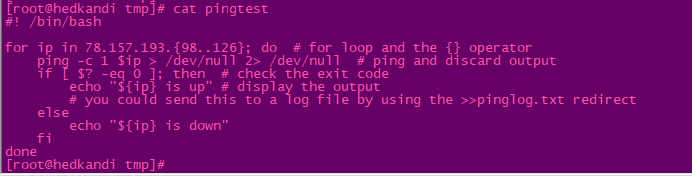
Of course the sysadmin helped me tweak the script:

Bear in mind that an IP is not pingable, it may take several seconds before the script moves on to the next IP, so the script in general may time some time to run and output its results, so if you are testing a 100 IPs, just pipe the results to a file on the system and run the job in the background so you can check the results when you are free later.
I am not cruel, here is the script for you to copy paste it and run on your Linux (tested on RHEL)
#! /bin/bash
for ip in XXX.XXX.XXX.{XXX..XXX}; do # for loop and the {} operator
ping -c 1 $ip > /dev/null 2> /dev/null # ping and discard output
if [ $? -eq 0 ]; then # check the exit code
echo "${ip} is up" # display the output
# you could send this to a log file by using the >>pinglog.txt redirect
else
echo "${ip} is down"
fi
done
The first search result had a lot of samples to work with and I picked the best:
Of course the sysadmin helped me tweak the script:
Bear in mind that an IP is not pingable, it may take several seconds before the script moves on to the next IP, so the script in general may time some time to run and output its results, so if you are testing a 100 IPs, just pipe the results to a file on the system and run the job in the background so you can check the results when you are free later.
I am not cruel, here is the script for you to copy paste it and run on your Linux (tested on RHEL)
#! /bin/bash
for ip in XXX.XXX.XXX.{XXX..XXX}; do # for loop and the {} operator
ping -c 1 $ip > /dev/null 2> /dev/null # ping and discard output
if [ $? -eq 0 ]; then # check the exit code
echo "${ip} is up" # display the output
# you could send this to a log file by using the >>pinglog.txt redirect
else
echo "${ip} is down"
fi
done


